Comparing Azure Web Hosting Options and Their Costs
How Static Web Apps, Functions, App Service and Container Apps compare on cost, scaling and suitable workloads
Azure has enough web hosting options to make a straightforward decision feel unnecessarily complicated. I normally start with the shape of the workload and work backwards from there. Static Web Apps, Functions, App Service and Container Apps each solve a different problem, and their baseline costs differ quite a bit.
These are the costs and trade-offs I use when choosing between them.
The Hosting Spectrum
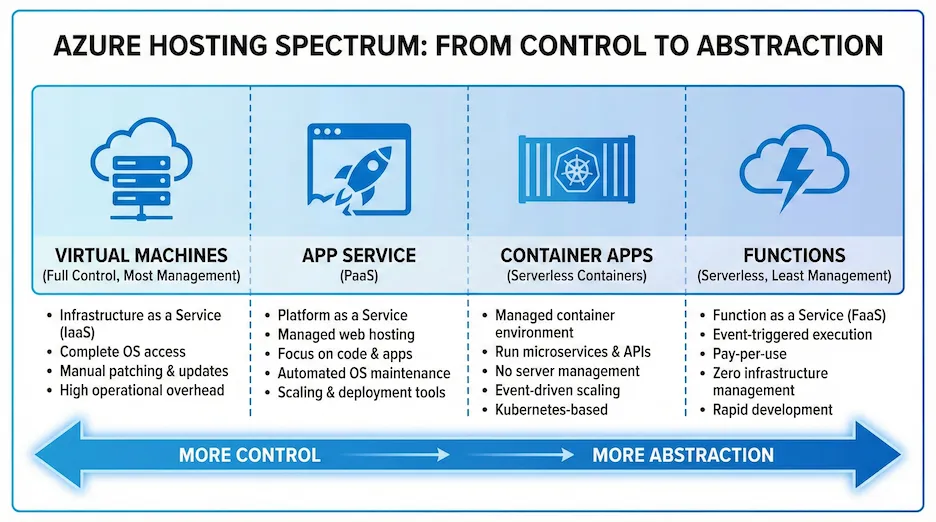
Roughly from simplest to most complex:
| Service | Best For | Starting Cost | Scaling |
|---|---|---|---|
| Static Web Apps | SPAs, Jamstack, static sites | Free | Automatic |
| Azure Functions | APIs, event processing, background jobs | Free (Consumption) | Automatic |
| App Service | Traditional web apps, APIs | ~$13/month (Basic) | Manual/Auto |
| Container Apps | Microservices, containers | ~$0 (scale to zero) | Automatic |
| AKS | Complex container orchestration | ~$70/month+ | Manual |
Static Web Apps
For SPAs and Jamstack sites, Azure Static Web Apps is often completely free. That makes it a useful default when the frontend does not need a server process.
The free tier
- 100GB bandwidth/month
- 2 custom domains with free SSL
- Built-in authentication (GitHub, Twitter, Azure AD)
- Global CDN distribution
- Staging environments for PRs
Koru Recruitment Platform
I built Koru, a recruitment demo platform, with its Blazor WASM frontend on Static Web Apps:
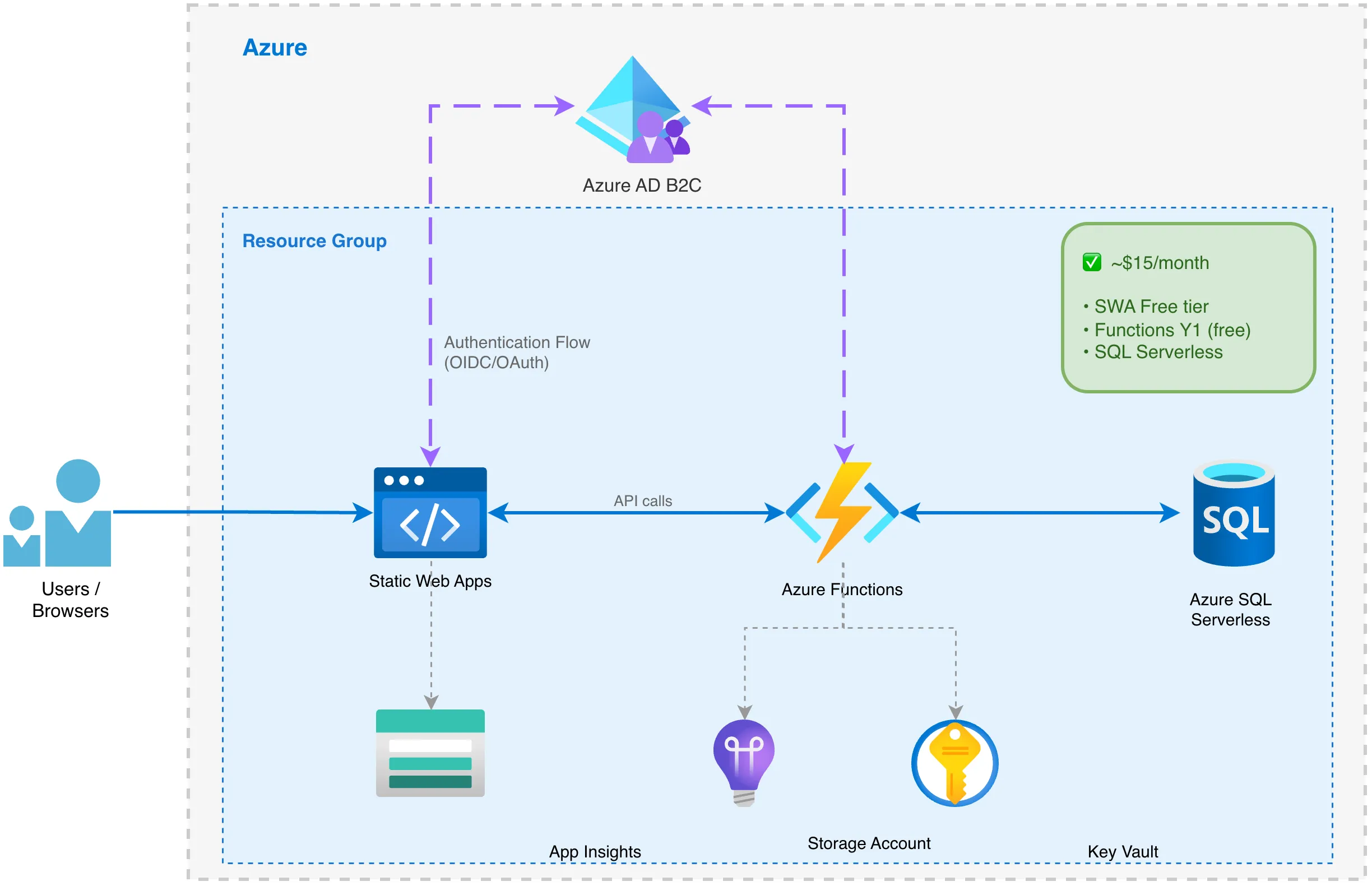
Total monthly cost: ~$15 (mostly the Azure SQL Serverless database)
The Static Web App itself costs $0.
Terraform Configuration
resource "azurerm_static_web_app" "web" {
  name                = "swa-${var.project_name}-${var.environment}"
  resource_group_name = azurerm_resource_group.main.name
  location            = var.location
  sku_tier            = "Free"
  sku_size            = "Free"

  tags = var.tags
}

# Custom domain (optional)
resource "azurerm_static_web_app_custom_domain" "apex" {
  static_web_app_id = azurerm_static_web_app.web.id
  domain_name       = var.custom_domain
  validation_type   = "cname-delegation"
}
Where Static Web Apps Fits
It works well for:
- React, Angular, Vue, Blazor WASM SPAs
- Documentation sites (Docusaurus, VuePress)
- Marketing sites
- JAMstack applications
I would choose something else for:
- Server-side rendering (SSR)
- Applications needing persistent connections (WebSockets)
- Large file uploads
Azure Functions: Serverless APIs
Azure Functions is the serverless compute option. On the Consumption plan, you pay for execution rather than an always-running host.
Pricing Tiers
| Plan | Cost | Use Case |
|---|---|---|
| Consumption (Y1) | First 1M executions free, then $0.20/million | Low/variable traffic |
| Premium (EP1) | ~$150/month | Pre-warmed, no cold starts |
| Dedicated | App Service pricing | Predictable high load |
The Koru API
The Koru recruitment platform uses Functions for its API:
resource "azurerm_service_plan" "functions" {
  name                = "asp-${var.project_name}-func-${var.environment}"
  resource_group_name = azurerm_resource_group.main.name
  location            = azurerm_resource_group.main.location
  os_type             = "Linux"
  sku_name            = "Y1"  # Consumption plan

  tags = var.tags
}

resource "azurerm_linux_function_app" "api" {
  name                       = "func-${var.project_name}-${random_string.suffix.result}"
  resource_group_name        = azurerm_resource_group.main.name
  location                   = azurerm_resource_group.main.location
  storage_account_name       = azurerm_storage_account.functions.name
  storage_account_access_key = azurerm_storage_account.functions.primary_access_key
  service_plan_id            = azurerm_service_plan.functions.id

  site_config {
    application_stack {
      dotnet_version              = "10.0"
      use_dotnet_isolated_runtime = true
    }
    cors {
      allowed_origins = [
        "https://${azurerm_static_web_app.web.default_host_name}",
        var.custom_domain != "" ? "https://${var.custom_domain}" : null
      ]
    }
  }

  app_settings = {
    "FUNCTIONS_WORKER_RUNTIME"    = "dotnet-isolated"
    "WEBSITE_RUN_FROM_PACKAGE"    = "1"
    "ConnectionStrings__Database" = "@Microsoft.KeyVault(SecretUri=${azurerm_key_vault_secret.db_connection.id})"
  }

  identity {
    type = "SystemAssigned"
  }

  tags = var.tags
}
Koru’s API costs about $0-5 per month and stays within the free tier at demo traffic levels.
Cold Starts: The Trade-off
Consumption plan Functions can have cold starts of 1-10 seconds. If that delay matters, the alternatives include:
- Premium Plan - Pre-warmed instances, no cold starts (~$150/month)
- Always Ready Instances - Keep minimum instances warm
- Durable Functions - For orchestration patterns
App Service
App Service is Azure’s traditional PaaS option. It has a standing monthly cost, but it suits applications that need an always-available process or do not fit the Functions execution model.
Pricing Tiers
| Tier | Starting Cost | Features |
|---|---|---|
| Free (F1) | $0 | 60 CPU min/day, no custom domain |
| Basic (B1) | ~$13/month | Custom domains, manual scale |
| Standard (S1) | ~$70/month | Auto-scale, staging slots |
| Premium (P1v3) | ~$140/month | Better performance, more slots |
When App Service Makes Sense
- Predictable, consistent traffic - Serverless savings don’t apply
- WebSocket requirements - SignalR, real-time features
- Large file processing - No Lambda-style timeout limits
- Existing .NET Framework apps - Windows hosting support
Terraform Example
resource "azurerm_service_plan" "main" {
  name                = "asp-${var.project_name}-${var.environment}"
  resource_group_name = azurerm_resource_group.main.name
  location            = azurerm_resource_group.main.location
  os_type             = "Linux"
  sku_name            = "B1"

  tags = var.tags
}

resource "azurerm_linux_web_app" "api" {
  name                = "app-${var.project_name}-${var.environment}"
  resource_group_name = azurerm_resource_group.main.name
  location            = azurerm_resource_group.main.location
  service_plan_id     = azurerm_service_plan.main.id

  site_config {
    always_on = true  # Prevents cold starts (not available on Free/Shared)

    application_stack {
      dotnet_version = "8.0"
    }
  }

  tags = var.tags
}
Container Apps
Azure Container Apps runs containerised workloads with serverless scaling. I tend to consider it when a workload already has a container image or needs more control than Functions provides.
Key Features
- Scale to zero - Like Functions, no cost when idle
- Dapr integration - Built-in microservices patterns
- Revisions - Blue/green deployments
- Container flexibility - Any language, any runtime
Pricing
- vCPU: $0.000024/second (~$62/month if always on)
- Memory: $0.000003/GB/second (~$8/month per GB if always on)
- Scale to zero: $0 when idle
When to Choose Container Apps
- Already containerised workloads
- Microservices architectures
- Need scale-to-zero but more control than Functions
- Dapr-based applications
Decision Framework
Need static hosting only?
└── YES → Static Web Apps (Free)
└── NO ↓

Need API/backend?
├── Simple APIs, event-driven?
│   └── Azure Functions (Consumption)
├── Traditional web app, WebSockets, long-running?
│   └── App Service
├── Microservices, containers, Dapr?
│   └── Container Apps
└── Complex orchestration, multiple teams?
    └── AKS
Cost Comparison
For a typical SPA + API application serving 100,000 requests/month:
| Architecture | Monthly Cost |
|---|---|
| SWA + Functions (Consumption) | $0-15 |
| SWA + Functions (Premium) | ~$150 |
| SWA + App Service (Basic) | ~$13 |
| SWA + App Service (Standard) | ~$70 |
| SWA + Container Apps | ~$5-20 |
For variable workloads at this request volume, Static Web Apps with Functions on the Consumption plan has the lowest baseline cost.
My Usual Starting Point
For a new SPA with a small API, I usually start with:
- Static Web Apps for the frontend (free)
- Azure Functions (Consumption) for the API (nearly free)
- Azure SQL Serverless for the database (~$5-15/month)
That combination provides:
- Near-zero baseline costs
- Automatic scaling
- Global distribution
- Managed security features
I move to App Service or Container Apps when the application has requirements that do not sit comfortably inside the serverless limits. Starting with the more expensive service in anticipation of traffic that may never arrive is an easy way to buy a lot of quiet compute.
My shorthand
My shorthand for the options is:
- Static Web Apps: Free hosting for SPAs
- Functions: Cheapest for APIs, watch for cold starts
- App Service: Always-on hosting with predictable costs
- Container Apps: Container hosting that can scale to zero
I start with the smallest service that meets the actual requirements, then move when the workload gives me a reason. The service name matters less than whether its charging model matches the way the application is used.
For an AWS example with the cost figures before and after the move, see How We Cut AWS Hosting Costs from $12,000 to $40 a Month.