From $12,000 to $40: How Serverless Slashed Our AWS Hosting Costs by 99.7%
A real-world case study of migrating an enterprise healthcare ordering system from EC2 to AWS Lambda and S3, cutting monthly hosting costs from $12,000 to just $40

What if I told you that we reduced our AWS hosting bill from $12,000 per month to $40 per month - a 99.7% reduction - while maintaining the same functionality? This isn’t a hypothetical scenario. This is a production system serving healthcare customers today, processing over 30,000 orders per month across three regions.
Let me introduce you to Meridian 🏥 - an enterprise healthcare ordering platform that escaped the “lift and shift” trap.
(Some names have been changed) 😉
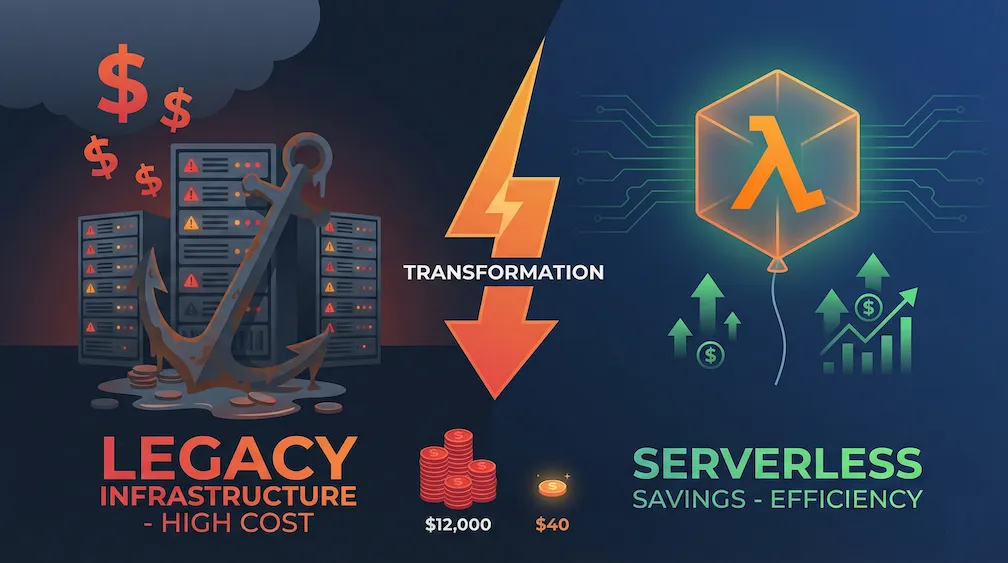
The Lift and Shift Trap
When organisations migrate to the cloud, the most common approach is “lift and shift” - take your existing VMs and move them to cloud VMs (EC2 in AWS, Virtual Machines in Azure). It’s quick, it’s familiar, and it’s expensive.
Meridian 🏥 started life as an on-premise .NET application. When the business decided to move to AWS, the path of least resistance was clear: spin up EC2 instances, deploy the application, done. The application worked exactly as before.
The invoice, however, was a shock.
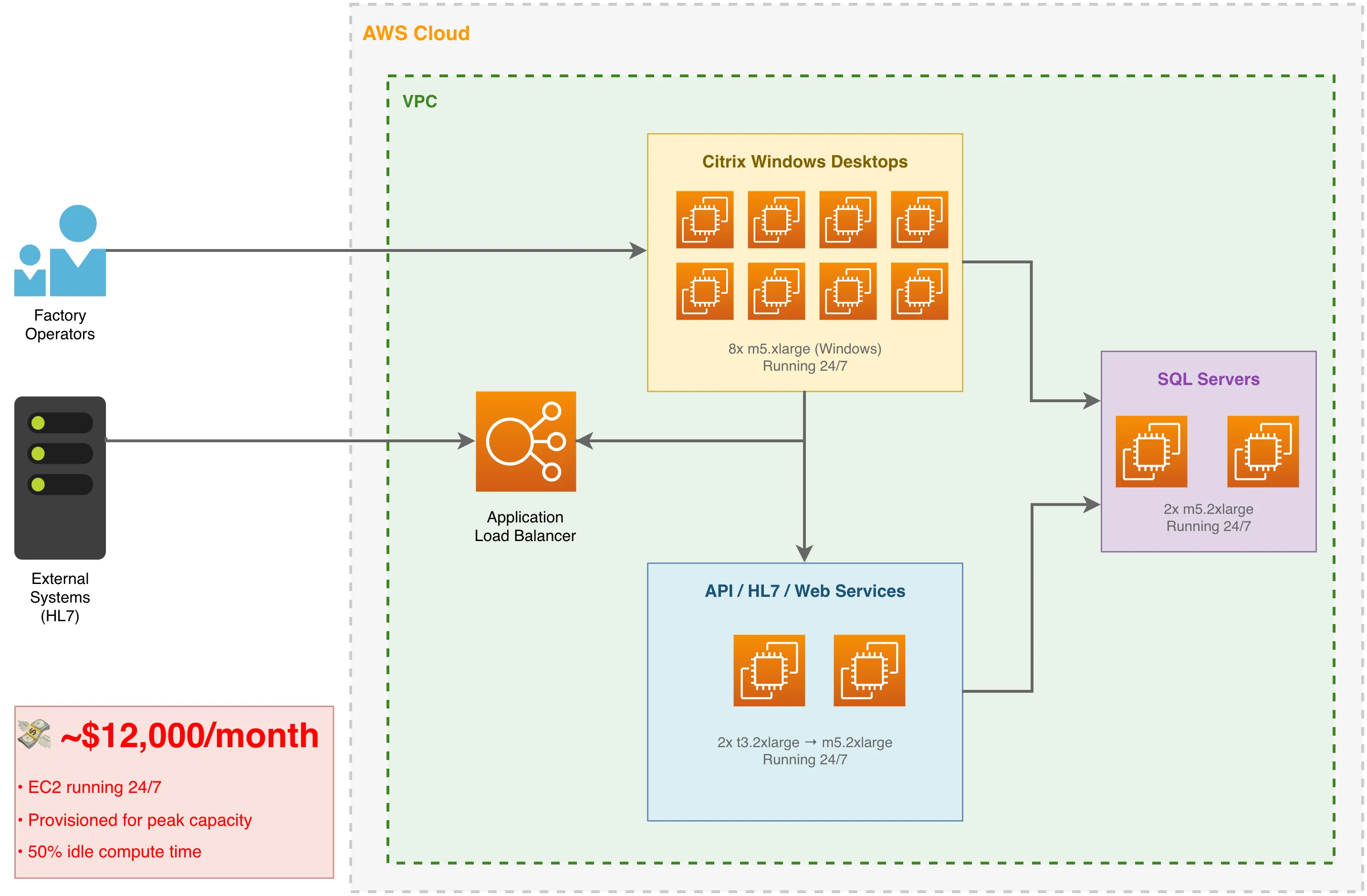
The $12,000 Monthly Bill
Here’s what was running in each primary region:
| Component | Instance Type | Hourly Rate | Monthly Cost |
|---|---|---|---|
| HL7 Processor / API / Web Service (2x) | t3.2xlarge → m5.2xlarge | $0.33 → $0.38 | ~$560 |
| Administrative Frontend with Citrix (8x) | m5.xlarge (Windows) | $0.376 | ~$2,200 |
| Application Load Balancers (2x) | ALB | - | ~$600 |
| EBS Storage, snapshots, data transfer | Various | - | ~$1,380 |
| Reserved capacity overhead | RI premiums | - | ~$800 |
| CloudWatch, WAF, secrets, misc | Various | - | ~$460 |
| Total (per primary region) | ~$6,000 |
And this excludes database costs (which remained constant after migration). In addition to the two primary regions, there was a third, smaller region that ran only 2 of the service EC2s and 2 Citrix servers.
Across all three regions combined, the total landed at ~$12,000/month.
In the primary regions, the Citrix-based Windows servers existed specifically to serve factory floor operators who needed desktop access to the administrative application. These machines were sized for peak shift changes, but peak load occurred maybe 40% of the time. The other 60%? Idle compute burning money.
The Serverless Alternative
AWS Lambda changes the economics completely. Instead of paying for servers 24/7, you pay only when code executes. For an application with variable load, this is transformative.
The New Architecture
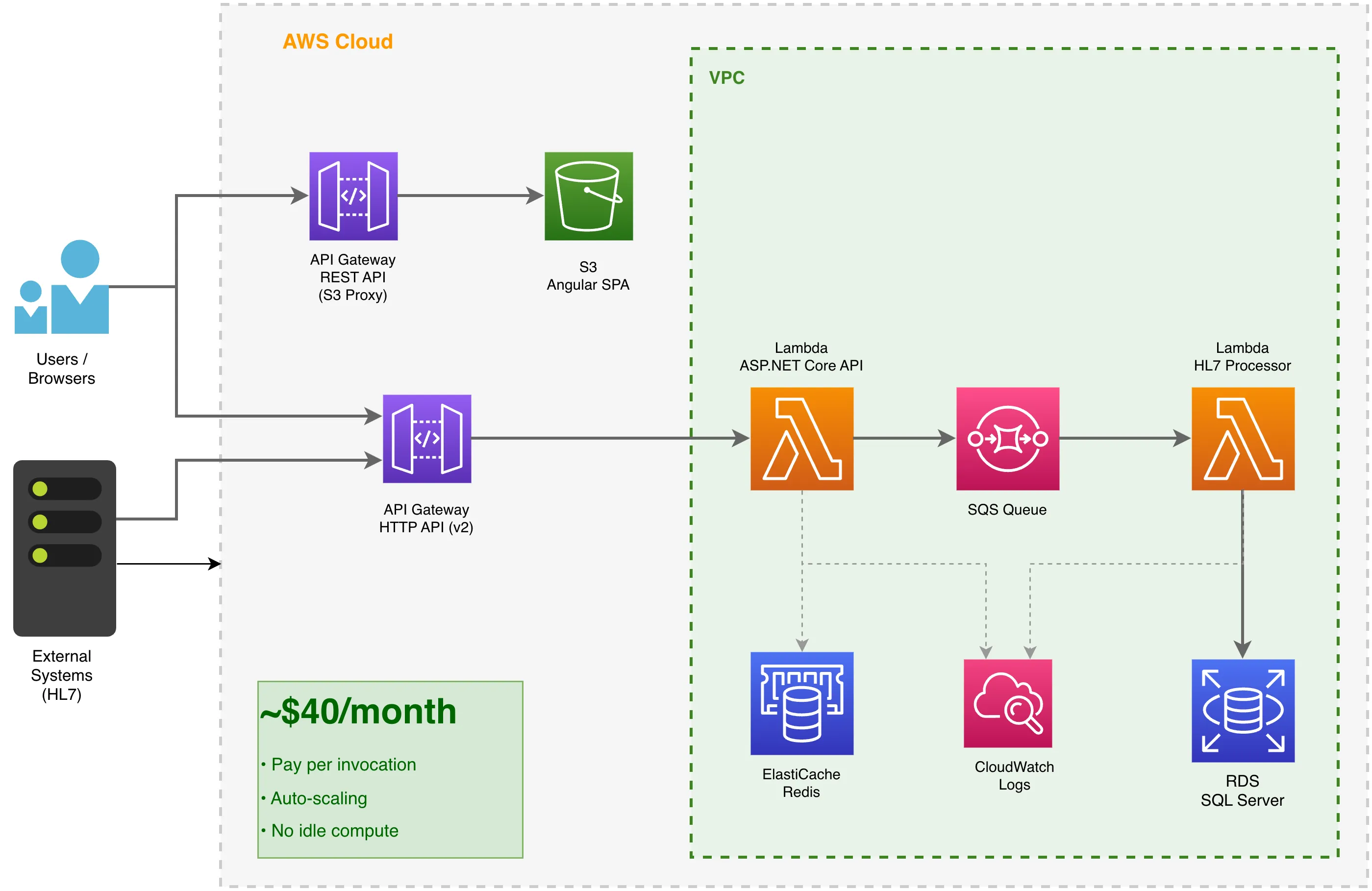
The redesigned architecture:
- AWS Lambda (API) - Hosts the ASP.NET Core API using Amazon.Lambda.AspNetCoreServer
- AWS Lambda (HL7 Processor) - Processes healthcare messages from SQS
- API Gateway HTTP API (v2) - Routes API requests to the ASP.NET Lambda
- API Gateway REST API - Acts as a proxy for the S3-hosted frontend
- S3 - Hosts the Angular SPA (static files)
- SQS - Queues HL7 messages for async processing (critical for staying within Lambda timeout)
- ElastiCache - Redis for distributed caching
The SQS Pattern for HL7 Processing
HL7 message processing can be complex and unpredictable in duration. Lambda has a 15-minute timeout, and we didn’t want API requests hanging. The solution? Immediate enqueue and quit.
- API Lambda receives the HL7 message
- Validates the payload and enqueues to SQS immediately
- Returns HTTP 202 Accepted - total time: milliseconds
- HL7 Processor Lambda picks up the message from SQS
- Processes the order in under 15 seconds
This pattern keeps the API responsive while handling complex processing asynchronously. If processing fails, SQS handles retries and dead-letter queues automatically.
API Gateway REST API as S3 Proxy
Here’s an interesting pattern: rather than exposing the S3 bucket directly (with all the CORS headaches), we use API Gateway REST API as a proxy to the S3-hosted Angular SPA. This gives us:
- Custom domain support - The frontend is served from
app.example.com, notbucket.s3.amazonaws.com - TLS termination - API Gateway handles certificates
- No CORS complexity - API and frontend share the same origin
- Path-based routing -
/static/*and/assets/*map to S3 paths
The Terraform looks like this:
resource "aws_api_gateway_rest_api" "proxy_api" {
  name               = var.api_name
  binary_media_types = ["*/*"]
  endpoint_configuration {
    types = ["REGIONAL"]
  }
}

resource "aws_api_gateway_integration" "root_get_integration" {
  rest_api_id             = aws_api_gateway_rest_api.proxy_api.id
  resource_id             = aws_api_gateway_rest_api.proxy_api.root_resource_id
  http_method             = aws_api_gateway_method.root_get_method.http_method
  type                    = "AWS"
  integration_http_method = "GET"
  uri                     = "arn:aws:apigateway:${data.aws_region.current.region}:s3:path/${var.site_bucket_name}/index.html"
  credentials             = var.s3_role
}
The {proxy+} catch-all route returns index.html for any unmatched path, enabling client-side routing in the Angular SPA.
Yes, You Can Run ASP.NET Core in Lambda
A common misconception is that Lambda only works for small functions. In reality, you can run an entire ASP.NET Core application in Lambda. Here’s the entry point:
public class LambdaEntryPoint : Amazon.Lambda.AspNetCoreServer.APIGatewayHttpApiV2ProxyFunction
{
    protected override void Init(IHostBuilder builder)
    {
        Log.Logger = new LoggerConfiguration()
            .Enrich.FromLogContext()
            .WriteTo.Console()
            .CreateLogger();

        builder
            .UseSerilog((ctx, config) =>
            {
                config.ReadFrom.Configuration(ctx.Configuration);
            })
            .ConfigureWebHostDefaults(webBuilder =>
            {
                webBuilder
                    .UseStartup<Startup>()
                    .UseLambdaServer();
            });
    }
}
The Startup.cs file remains almost identical to a traditional ASP.NET Core application. Controllers, dependency injection, middleware - it all works.
Terraform: Infrastructure as Code
Here’s the Terraform that provisions the Lambda function:
resource "aws_lambda_function" "lambda" {
  function_name    = local.function_name
  description      = local.function_description
  filename         = local.function_package_path
  source_code_hash = filebase64sha256(local.function_package_path)
  role             = data.aws_iam_role.lambda.arn
  handler          = local.function_handler
  runtime          = "dotnet8"
  memory_size      = 1024
  timeout          = 30

  logging_config {
    application_log_level = "INFO"
    log_format            = "JSON"
    log_group             = aws_cloudwatch_log_group.lambda.name
    system_log_level      = "INFO"
  }

  vpc_config {
    security_group_ids = [data.aws_security_group.lambda.id]
    subnet_ids         = local.subnet_ids
  }

  environment {
    variables = var.function_environment_variables
  }
}
And the API Gateway that routes traffic:
resource "aws_apigatewayv2_api" "api_lambda" {
  name          = local.api_name
  protocol_type = "HTTP"

  tags = merge(var.tags, { "Name" = local.api_name })
}

resource "aws_lambda_permission" "lambda" {
  statement_id  = "AllowExecutionFromAPIGateway"
  action        = "lambda:InvokeFunction"
  function_name = aws_lambda_function.lambda.function_name
  principal     = "apigateway.amazonaws.com"
  source_arn    = "${aws_apigatewayv2_api.api_lambda.execution_arn}/*/*"
}
For the static Angular frontend, we use S3 with a classic API Gateway (REST API) proxy:
resource "aws_s3_bucket" "site_bucket" {
  bucket = var.site_bucket_name

  tags = merge(var.tags, {
    Name = var.site_bucket_name
  })
}

resource "aws_s3_bucket_website_configuration" "website" {
  bucket = aws_s3_bucket.site_bucket.id

  index_document {
    suffix = "index.html"
  }

  error_document {
    key = "error.html"
  }
}

resource "aws_api_gateway_rest_api" "proxy_api" {
  name               = var.api_name
  description        = "Client proxy"
  binary_media_types = ["*/*"]
  endpoint_configuration {
    types = ["REGIONAL"]
  }
}

# Root route -> S3 index.html (SPA entry point)
resource "aws_api_gateway_integration" "root_get_integration" {
  rest_api_id             = aws_api_gateway_rest_api.proxy_api.id
  resource_id             = aws_api_gateway_rest_api.proxy_api.root_resource_id
  http_method             = aws_api_gateway_method.root_get_method.http_method
  type                    = "AWS"
  integration_http_method = "GET"
  uri                     = "arn:aws:apigateway:${data.aws_region.current.region}:s3:path/${var.site_bucket_name}/index.html"
  credentials             = var.s3_role
}
The $40 Monthly Bill
After migration, the new cost structure across all regions combined:
| Component | Pricing Model | Monthly Cost |
|---|---|---|
| Lambda (API) | Pay per invocation | ~$12 |
| Lambda (HL7 Processor) | Pay per invocation | ~$8 |
| API Gateway HTTP API (v2) | Per request | ~$5 |
| API Gateway REST API (S3 proxy) | Per request | ~$3 |
| S3 (static hosting) | Storage + requests | ~$2 |
| CloudWatch Logs | Ingestion + storage | ~$10 |
| Total (all regions) | ~$40 |
That’s $40 vs $12,000 per month (all regions combined) - a 99.7% reduction.
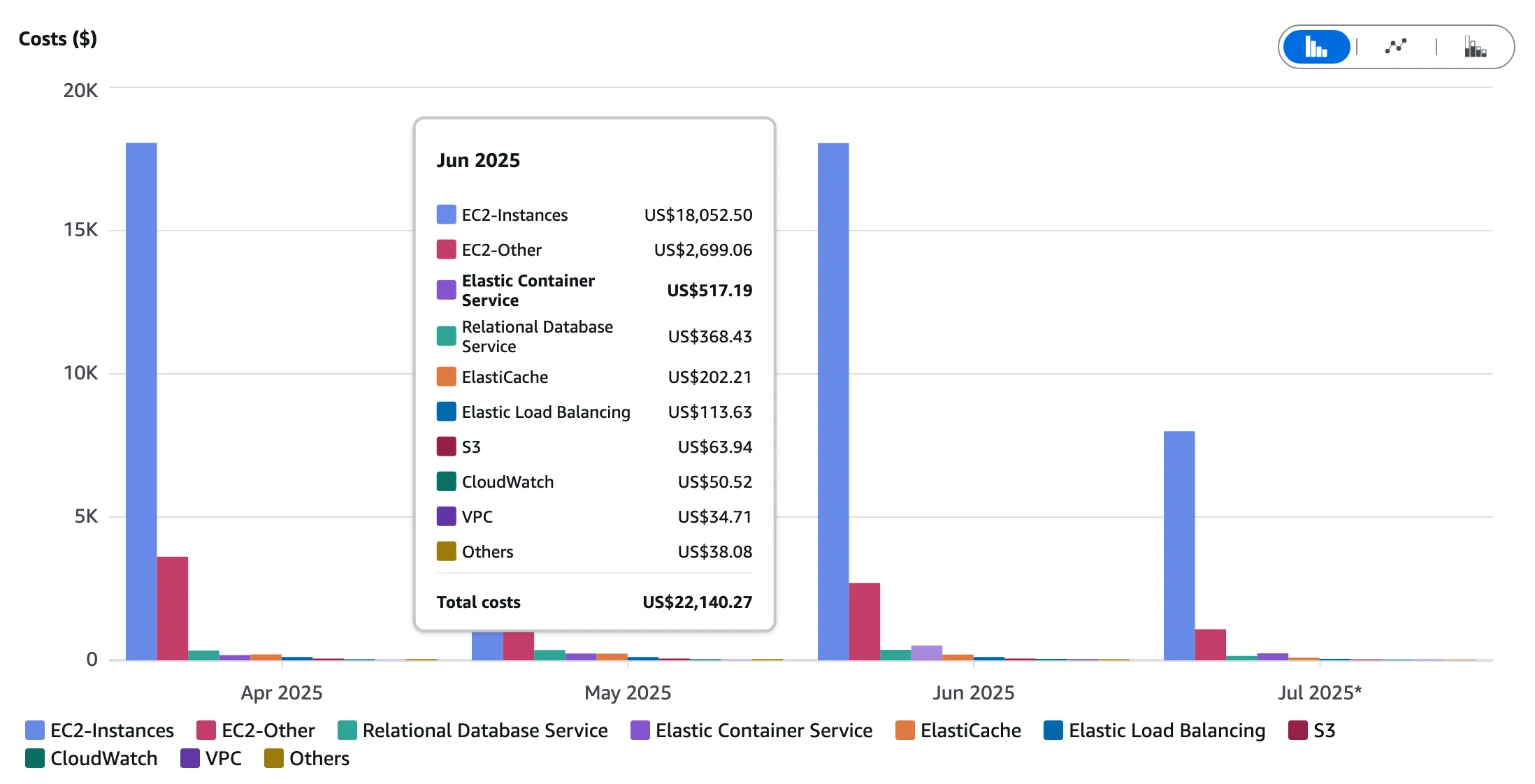 This chart illustrates the dramatic cost savings achieved by moving from EC2 to a serverless architecture. The Lambda and S3-based solution costs are so low, they are listed as “Others”.
1. No Idle Compute
EC2 instances run 24/7. Lambda runs only when invoked. For a business application with working-hours traffic, this is the difference between paying for 720 hours vs maybe 50 hours of actual compute.
2. Automatic Scaling
With EC2, we provisioned for peak load. With Lambda, scaling is automatic and instantaneous. No more paying for capacity you rarely use.
3. No Server Management
No patching, no OS updates, no capacity planning. AWS manages the infrastructure.
4. SQS Replaces Always-On Workers
Background processing moved from dedicated EC2 workers to Lambda functions triggered by SQS. If no messages are in the queue, no compute runs.
Trade-offs and Considerations
Serverless comes with trade-offs. Consider:
- Cold starts - First request after idle period is slower (~1-3 seconds for .NET). Use Provisioned Concurrency if this is critical.
- Execution limits - Lambda has a 15-minute timeout. Long-running processes need SQS queuing (as we did for HL7 processing).
- VPC considerations - Lambda in VPC adds latency. Plan your network architecture carefully.
- Observability - Structured logging is essential. We use Serilog with CloudWatch Logs, outputting JSON for easy querying. It works brilliantly.
The Migration Path
We didn’t rewrite everything overnight. The migration was gradual:
- Platform-agnostic rewrite - Migrated from .NET Framework to .NET Core for cross-platform compatibility
- Lambda-ify the API - Added Lambda entry point alongside traditional hosting (same codebase runs both ways)
- Deploy in parallel - Ran both EC2 and Lambda, routing traffic gradually via weighted DNS
- Migrate static assets - Moved Angular app to S3 behind API Gateway REST API proxy
- Decommission EC2 - Once stable, terminated the instances
The migration was done with zero customer-facing downtime.
Conclusion
Lift and shift is a valid first step to get to the cloud quickly. But don’t stop there. The real cost benefits come from re-architecting for cloud-native services.
For Meridian 🏥 (across three regions):
- Before: ~$12,000/month (EC2 lift and shift)
- After: ~$40/month (Lambda + S3)
- Annual savings: ~$143,500
That’s not a typo. We save roughly $144,000 per year on a single application, while processing 30,000+ healthcare orders monthly.
If you’re running workloads on EC2 that have variable load and don’t require persistent connections, Lambda deserves serious consideration. The economics are simply too compelling to ignore.
Next in this series: Azure Web Hosting: VMs, App Service, Functions, or Static Web Apps? - comparing hosting options for a recruitment platform on Azure.