Azure Web Hosting Options Compared: From Free Tier to Enterprise Scale
A practical guide to Azure's web hosting spectrum - Static Web Apps, Functions, App Service, and Container Apps - with real costs and use cases
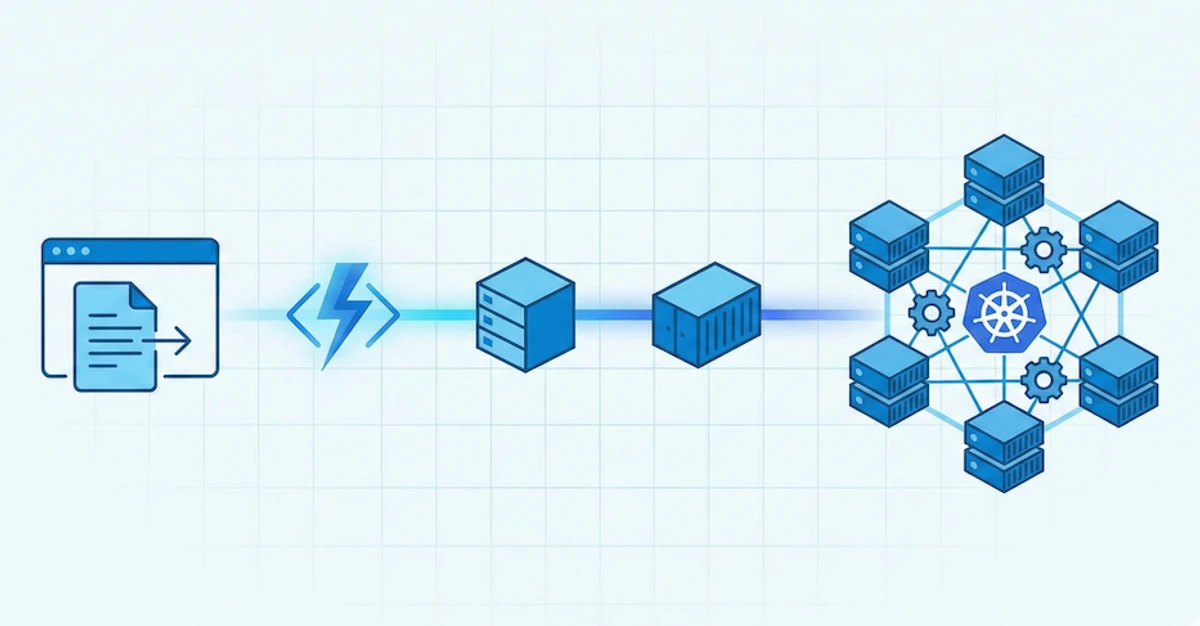
Azure offers a bewildering array of web hosting options. App Service, Functions, Static Web Apps, Container Apps, AKS… how do you choose? And more importantly, how do you avoid overspending?
This guide cuts through the confusion with real-world examples and actual costs from production workloads.
The Hosting Spectrum
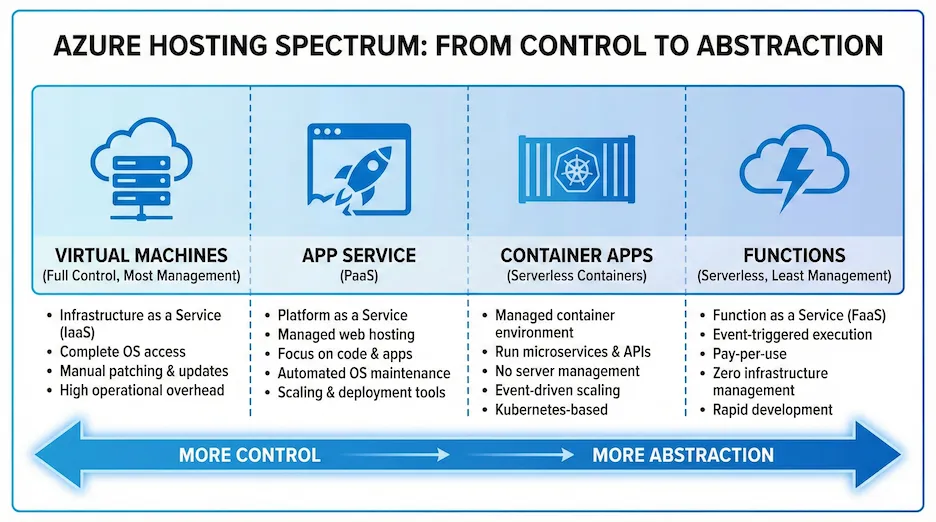
From simplest to most complex:
| Service | Best For | Starting Cost | Scaling |
|---|---|---|---|
| Static Web Apps | SPAs, Jamstack, static sites | Free | Automatic |
| Azure Functions | APIs, event processing, background jobs | Free (Consumption) | Automatic |
| App Service | Traditional web apps, APIs | ~$13/month (Basic) | Manual/Auto |
| Container Apps | Microservices, containers | ~$0 (scale to zero) | Automatic |
| AKS | Complex container orchestration | ~$70/month+ | Manual |
Let’s dive into each with real examples.
Static Web Apps: The Free Tier Champion
Azure Static Web Apps is criminally underrated. For SPAs and Jamstack sites, it’s often completely free.
What You Get (Free Tier)
- 100GB bandwidth/month
- 2 custom domains with free SSL
- Built-in authentication (GitHub, Twitter, Azure AD)
- Global CDN distribution
- Staging environments for PRs
Real Example: Koru Recruitment Platform
I built Koru, a recruitment demo platform, using Static Web Apps for the Blazor WASM frontend:
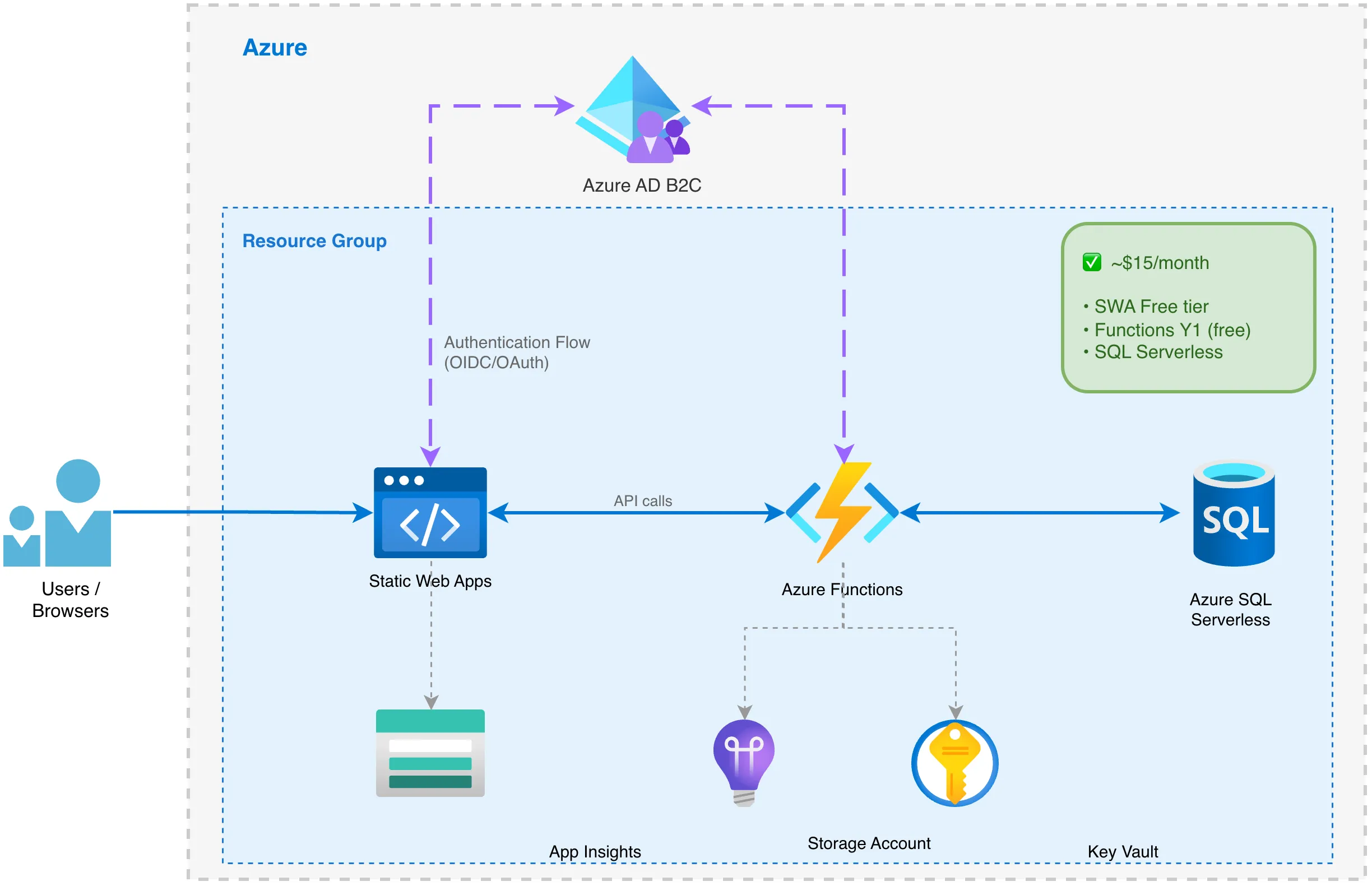
Total monthly cost: ~$15 (mostly the Azure SQL Serverless database)
The Static Web App itself? $0.
Terraform Configuration
resource "azurerm_static_web_app" "web" {
  name                = "swa-${var.project_name}-${var.environment}"
  resource_group_name = azurerm_resource_group.main.name
  location            = var.location
  sku_tier            = "Free"
  sku_size            = "Free"

  tags = var.tags
}

# Custom domain (optional)
resource "azurerm_static_web_app_custom_domain" "apex" {
  static_web_app_id = azurerm_static_web_app.web.id
  domain_name       = var.custom_domain
  validation_type   = "cname-delegation"
}
When to Use Static Web Apps
✅ Perfect for:
- React, Angular, Vue, Blazor WASM SPAs
- Documentation sites (Docusaurus, VuePress)
- Marketing sites
- JAMstack applications
❌ Not suitable for:
- Server-side rendering (SSR)
- Applications needing persistent connections (WebSockets)
- Large file uploads
Azure Functions: Serverless APIs
Azure Functions is the serverless compute option. Like AWS Lambda, you pay only for execution time.
Pricing Tiers
| Plan | Cost | Use Case |
|---|---|---|
| Consumption (Y1) | First 1M executions free, then $0.20/million | Low/variable traffic |
| Premium (EP1) | ~$150/month | Pre-warmed, no cold starts |
| Dedicated | App Service pricing | Predictable high load |
Real Example: Koru API
The Koru recruitment platform uses Functions for its API:
resource "azurerm_service_plan" "functions" {
  name                = "asp-${var.project_name}-func-${var.environment}"
  resource_group_name = azurerm_resource_group.main.name
  location            = azurerm_resource_group.main.location
  os_type             = "Linux"
  sku_name            = "Y1"  # Consumption plan

  tags = var.tags
}

resource "azurerm_linux_function_app" "api" {
  name                       = "func-${var.project_name}-${random_string.suffix.result}"
  resource_group_name        = azurerm_resource_group.main.name
  location                   = azurerm_resource_group.main.location
  storage_account_name       = azurerm_storage_account.functions.name
  storage_account_access_key = azurerm_storage_account.functions.primary_access_key
  service_plan_id            = azurerm_service_plan.functions.id

  site_config {
    application_stack {
      dotnet_version              = "10.0"
      use_dotnet_isolated_runtime = true
    }
    cors {
      allowed_origins = [
        "https://${azurerm_static_web_app.web.default_host_name}",
        var.custom_domain != "" ? "https://${var.custom_domain}" : null
      ]
    }
  }

  app_settings = {
    "FUNCTIONS_WORKER_RUNTIME"    = "dotnet-isolated"
    "WEBSITE_RUN_FROM_PACKAGE"    = "1"
    "ConnectionStrings__Database" = "@Microsoft.KeyVault(SecretUri=${azurerm_key_vault_secret.db_connection.id})"
  }

  identity {
    type = "SystemAssigned"
  }

  tags = var.tags
}
Monthly cost for Koru’s API: ~$0-5 (stays within free tier for demo traffic)
Cold Starts: The Trade-off
Consumption plan Functions have cold starts of 1-10 seconds. For APIs where this matters:
- Premium Plan - Pre-warmed instances, no cold starts (~$150/month)
- Always Ready Instances - Keep minimum instances warm
- Durable Functions - For orchestration patterns
App Service: The Workhorse
App Service is Azure’s traditional PaaS offering. It’s more expensive than serverless but offers more control.
Pricing Tiers
| Tier | Starting Cost | Features |
|---|---|---|
| Free (F1) | $0 | 60 CPU min/day, no custom domain |
| Basic (B1) | ~$13/month | Custom domains, manual scale |
| Standard (S1) | ~$70/month | Auto-scale, staging slots |
| Premium (P1v3) | ~$140/month | Better performance, more slots |
When App Service Makes Sense
- Predictable, consistent traffic - Serverless savings don’t apply
- WebSocket requirements - SignalR, real-time features
- Large file processing - No Lambda-style timeout limits
- Existing .NET Framework apps - Windows hosting support
Terraform Example
resource "azurerm_service_plan" "main" {
  name                = "asp-${var.project_name}-${var.environment}"
  resource_group_name = azurerm_resource_group.main.name
  location            = azurerm_resource_group.main.location
  os_type             = "Linux"
  sku_name            = "B1"

  tags = var.tags
}

resource "azurerm_linux_web_app" "api" {
  name                = "app-${var.project_name}-${var.environment}"
  resource_group_name = azurerm_resource_group.main.name
  location            = azurerm_resource_group.main.location
  service_plan_id     = azurerm_service_plan.main.id

  site_config {
    always_on = true  # Prevents cold starts (not available on Free/Shared)

    application_stack {
      dotnet_version = "8.0"
    }
  }

  tags = var.tags
}
Container Apps: The Best of Both Worlds?
Azure Container Apps is the newest option, combining container flexibility with serverless scaling.
Key Features
- Scale to zero - Like Functions, no cost when idle
- Dapr integration - Built-in microservices patterns
- Revisions - Blue/green deployments
- Container flexibility - Any language, any runtime
Pricing
- vCPU: $0.000024/second (~$62/month if always on)
- Memory: $0.000003/GB/second (~$8/month per GB if always on)
- Scale to zero: $0 when idle
When to Choose Container Apps
- Already containerised workloads
- Microservices architectures
- Need scale-to-zero but more control than Functions
- Dapr-based applications
Decision Framework
Need static hosting only?
└── YES → Static Web Apps (Free)
└── NO ↓

Need API/backend?
├── Simple APIs, event-driven?
│   └── Azure Functions (Consumption)
├── Traditional web app, WebSockets, long-running?
│   └── App Service
├── Microservices, containers, Dapr?
│   └── Container Apps
└── Complex orchestration, multiple teams?
    └── AKS
Cost Comparison: Real Numbers
For a typical SPA + API application serving 100,000 requests/month:
| Architecture | Monthly Cost |
|---|---|
| SWA + Functions (Consumption) | $0-15 |
| SWA + Functions (Premium) | ~$150 |
| SWA + App Service (Basic) | ~$13 |
| SWA + App Service (Standard) | ~$70 |
| SWA + Container Apps | ~$5-20 |
The serverless combination (SWA + Functions Consumption) is dramatically cheaper for variable workloads.
My Recommendation
For most new projects, start with:
- Static Web Apps for the frontend (free)
- Azure Functions (Consumption) for the API (nearly free)
- Azure SQL Serverless for the database (~$5-15/month)
This combination gives you:
- Near-zero baseline costs
- Automatic scaling
- Global distribution
- Enterprise-grade security
Upgrade to App Service or Container Apps only when you hit serverless limitations.
Conclusion
Azure’s hosting options aren’t confusing when you understand the trade-offs:
- Static Web Apps: Free, perfect for SPAs
- Functions: Cheapest for APIs, watch for cold starts
- App Service: Reliable workhorse, predictable costs
- Container Apps: Modern alternative, scale-to-zero containers
Start serverless, scale up only when needed. Your wallet will thank you.
See also: From $12,000 to $40: How Serverless Slashed Our AWS Hosting Costs for a similar AWS journey.