Building Koru Recruitment
How I built a low-cost recruitment platform, from the first architecture decisions through to its Azure DevOps pipelines
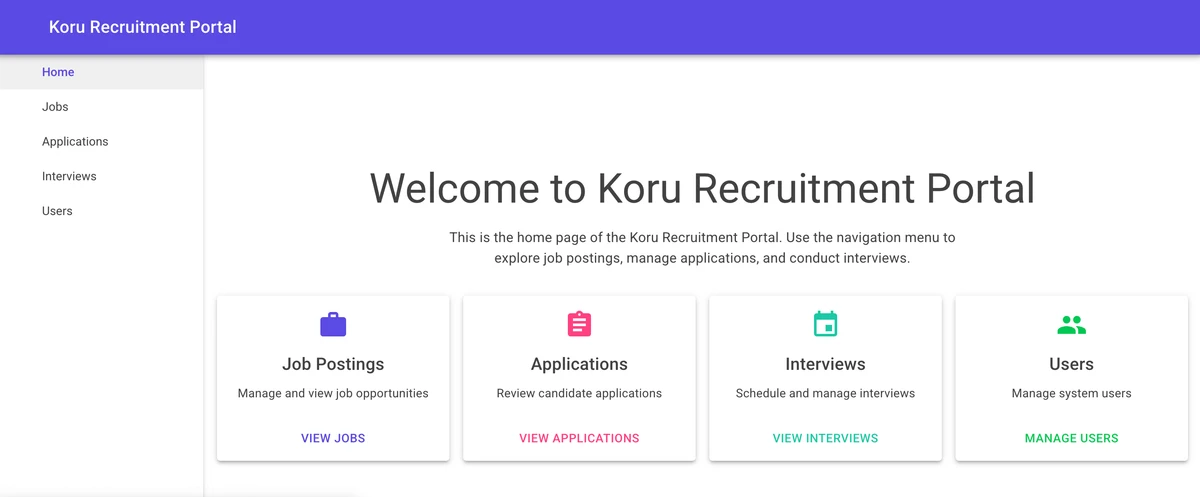
Koru started with a fairly ordinary brief: build a recruitment platform for a government client, build it quickly, and keep the running costs below $50 a month. The budget ruled out quite a few lazy architecture decisions, which made the project more interesting.
Koru (pronounced “koh-roo”) is the Ijaw word for “wait”. Applicants wait for opportunities; hiring managers wait for the right candidates. The name stuck.
See it live: Koru Recruitment Platform
What it needed to do
The requirements were not unusual on their own, but there were quite a few of them:
- A public job portal accessible to residents, diaspora, and general applicants
- Complete application lifecycle management
- Role-based access (Admin, HR Staff, Applicants)
- Secure document management
- Email notifications
- Admin dashboard with real-time metrics
- Budget constraint: Monthly operating costs under $50 until it scales
And, naturally, it was wanted as soon as possible.
Picking the stack
I settled on Azure services that could sit mostly idle without charging us for the privilege:
- Frontend: Blazor WebAssembly with MudBlazor components
- Backend: Azure Functions
- Database: Azure SQL Database (Basic tier)
- Storage: Azure Blob Storage for documents
- Hosting: Azure Static Web Apps
- Infrastructure as Code: Terraform
- CI/CD: Azure DevOps Pipelines
There is nothing exotic here. Static Web Apps hosts the Blazor frontend, Functions handles the API, and SQL and Blob Storage deal with the data. At the level of traffic we expected initially, most of it stays inside the free or cheapest tiers.
How I used coding assistants
I used coding assistants throughout the build, but not by asking for “a recruitment system” and accepting whatever appeared. That would have produced a lot of code very quickly and a lot of problems shortly afterwards.
The useful part was splitting the work into pieces I could review: schema, API, frontend, pipelines and infrastructure. I wrote an overall brief, then a smaller brief for each part.
The starting point looked roughly like this:
I want you to create a recruitment platform for a government client.
First, create a master prompt that defines the overall architecture.
Then, generate chapter prompts for each major component:
- Database schema design
- API layer implementation
- Frontend components
- CI/CD pipelines
- Infrastructure as Code
Breaking the project up this way forced me to settle dependencies and order of work before generating code. It also meant a bad result was confined to one part of the system rather than sprayed across the whole repository. The briefs were reusable and, more importantly, reviewable.
Architecture first
The first pass produced the basic shape of the application:
- A complete Clean Architecture structure
- Domain models for all entities
- Repository interfaces
- Service layer abstractions
That gave me a starting point, not a finished architecture. I still had to check the boundaries, remove unnecessary abstractions and make sure the generated code matched the system we were actually building.
Database design
I described the recruitment domain and worked from that to the following schema:
├── Users                    # User accounts and authentication
├── ApplicantProfiles        # Detailed applicant information
├── JobPostings             # Job posting management
├── Applications            # Application tracking
├── Interviews              # Interview scheduling
├── ApplicationDocuments    # Document management
├── ApplicationWorkflows    # Workflow tracking
├── WorkflowStages          # Workflow configuration
└── AuditLogs               # Complete audit trail
It was a quicker route to a first model than drawing the whole ERD by hand, but it did not settle the design. I still had to work through ownership, relationships, audit history and what happens when a workflow changes.
Schema management
This was one of the places where I rejected the generated approach. GitHub Copilot initially used Entity Framework migrations for schema management. I have used that pattern before, and I do not like it for enterprise software.
My objections are fairly practical:
- Schema drift between environments
- Limited control over complex SQL constructs
- Difficult collaboration with DBAs
- Hard to audit what actually runs in production
I replaced the migrations with SQL Server Data Tools SDK-style projects. Every table, constraint and index lives in a source-controlled .sql file.
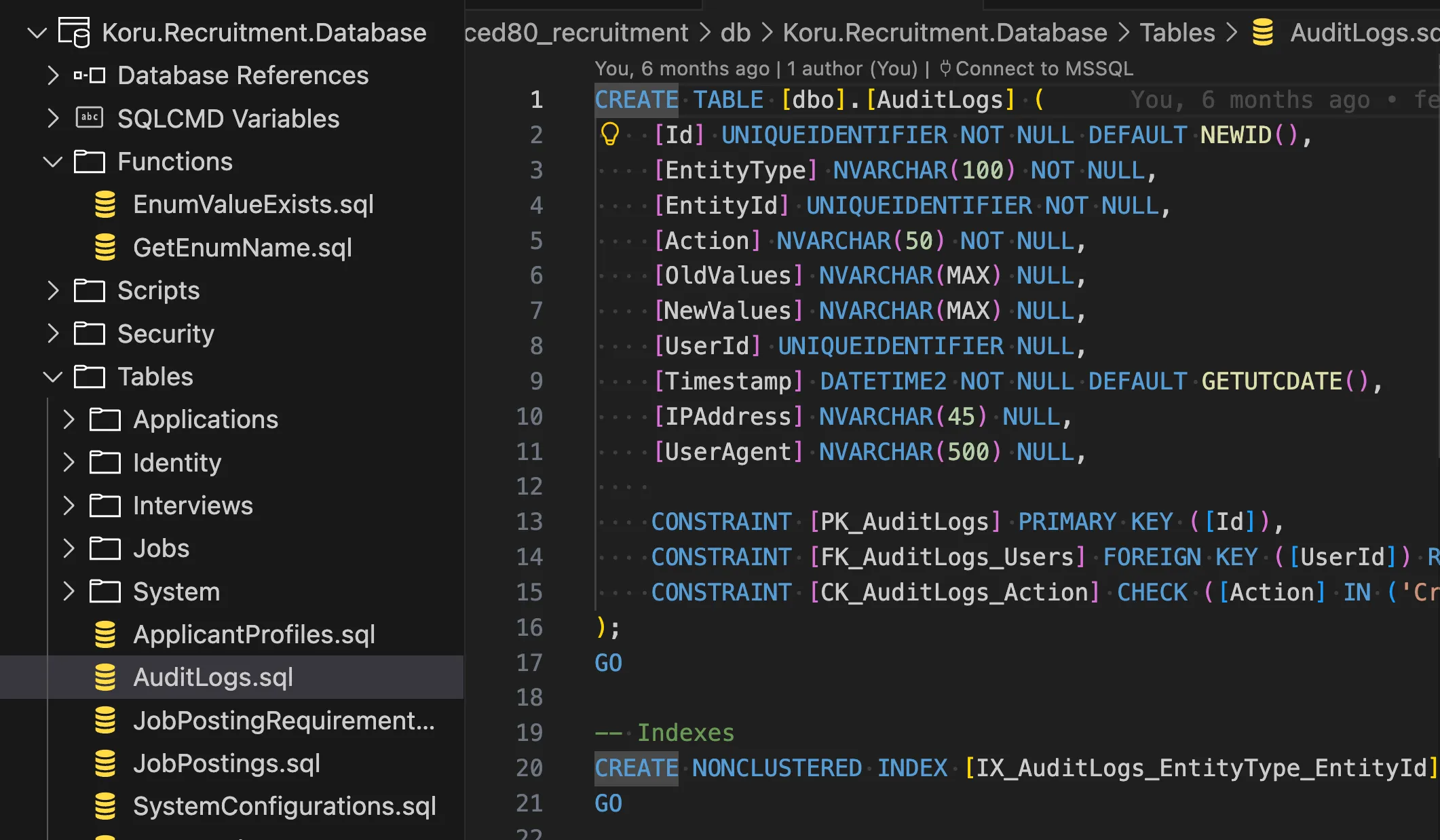 The database schema organised as source-controlled SQL files
The project builds a dacpac, and deployment uses schema comparison to work out what has to change. It also gives a DBA SQL to review instead of asking them to infer the database change from C# migration code.
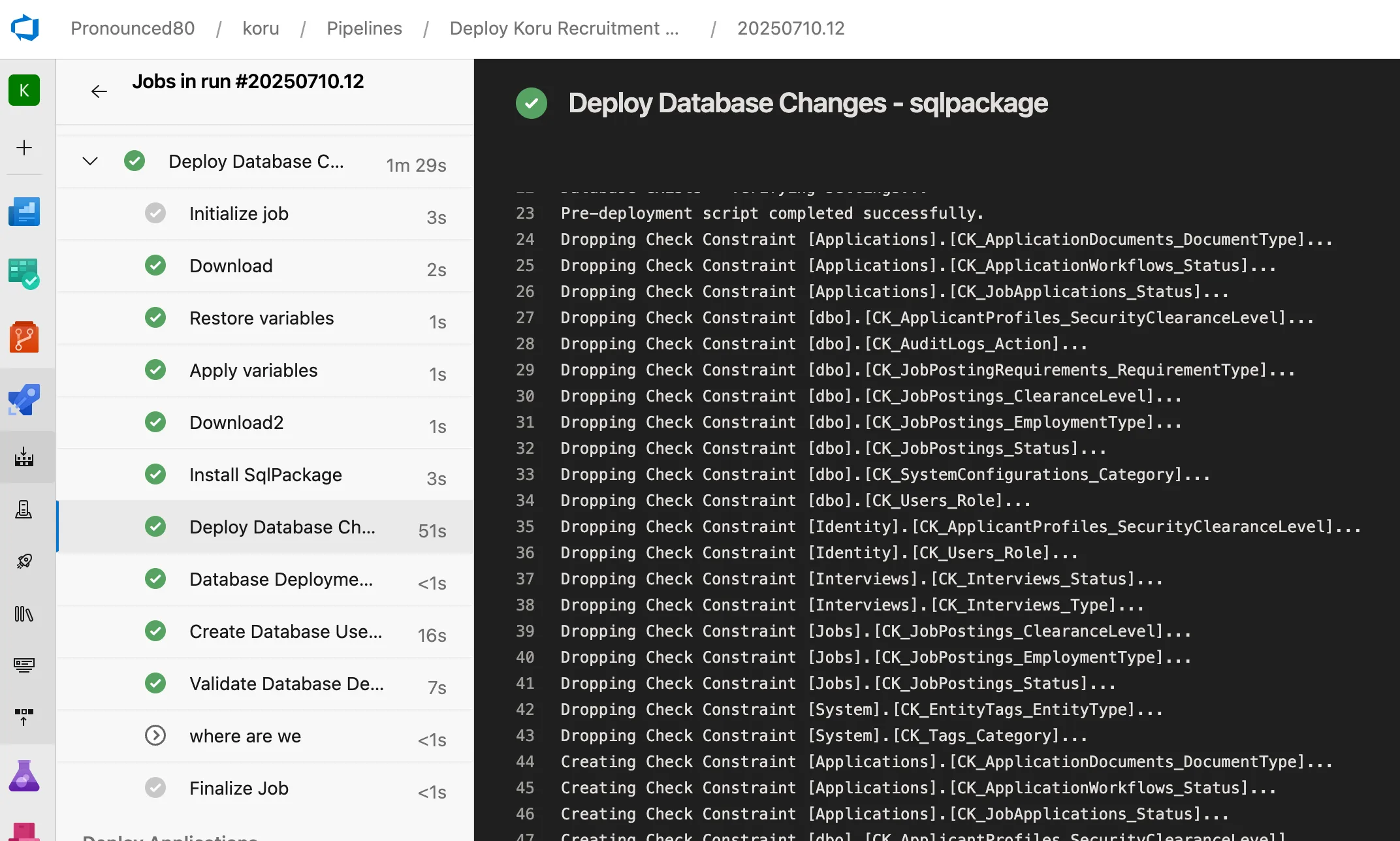 SqlPackage applying the schema changes from the dacpac
Read more: Why I Choose SQL Projects Over Entity Framework Migrations
Azure DevOps pipelines
The assistants were useful for producing the repetitive parts of the Azure DevOps YAML, particularly the templates. They were less useful at deciding how the environments should differ or which identity should be allowed to deploy what. I kept those decisions explicit and reviewed the generated conditions carefully.
The build pipeline has:
- Multi-stage builds (dotnet, database, client)
- Parallel execution where possible
- Artifact publishing
- Test execution with coverage reports
The deployment side uses:
- Template-based architecture for reusability
- Environment-specific variable management
- Terraform integration with state management
- Automatic backend storage creation
- Health checks and validation at each stage
- CAF-compliant resource naming
The pipeline follows this flow:
Build → Dev → Prod
         ↓
    [Infra] → [Database] → [Application] → [Validation]
Infrastructure as code
I used Terraform for the Azure resources. Generated Terraform still needed the same review as generated application code, especially around names, state and secrets. The final configuration includes:
- Azure CAF naming conventions
- Environment separation
- State management with Azure Storage backend
- Secure handling of sensitive variables via Key Vault
What the review work looked like
The first generated version of a component was rarely the version I kept. I would generate a small part, review it, point out a specific problem and run it again. Sometimes editing the code myself was quicker than trying to describe the correction.
That process depended on knowing what I expected from the architecture. Clean Architecture and SOLID terminology helped when describing boundaries, but naming a pattern did not make the output correct. I removed abstractions that did not earn their place and rejected technically valid suggestions that did not fit the deployment or security model.
The government context also affected decisions around data sovereignty, accessibility and compliance. A coding assistant could help implement those decisions, but it could not make them on the client’s behalf.
Documentation needed review as well. Generated comments tended to explain obvious code, and generated README files often described the intended system rather than the one that had actually been built. I kept the useful parts and corrected or removed the rest.
What was built
The deployed platform covers the main recruitment workflow:
Job postings
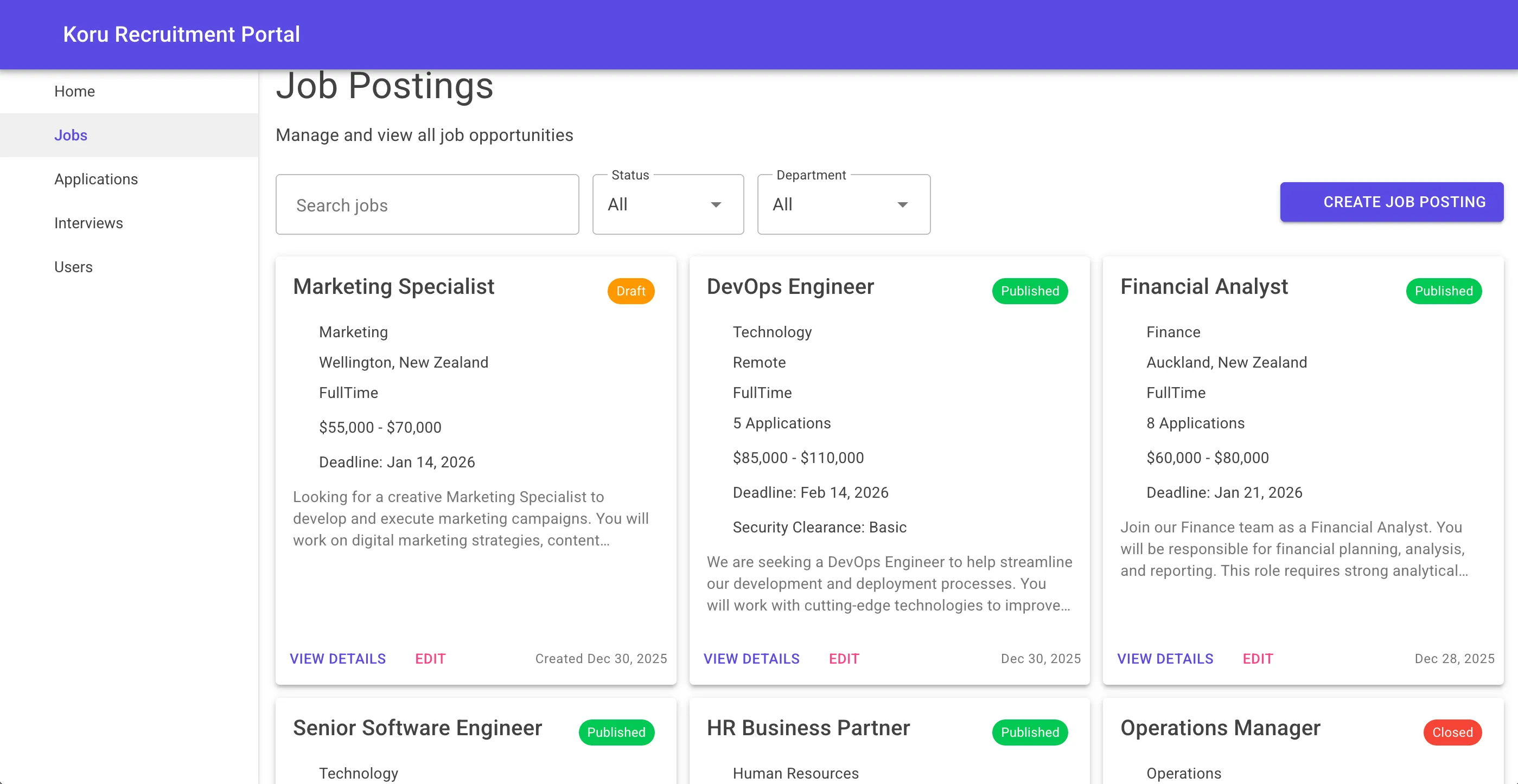 HR managers can create, filter, and manage job postings with full status tracking
Application tracking
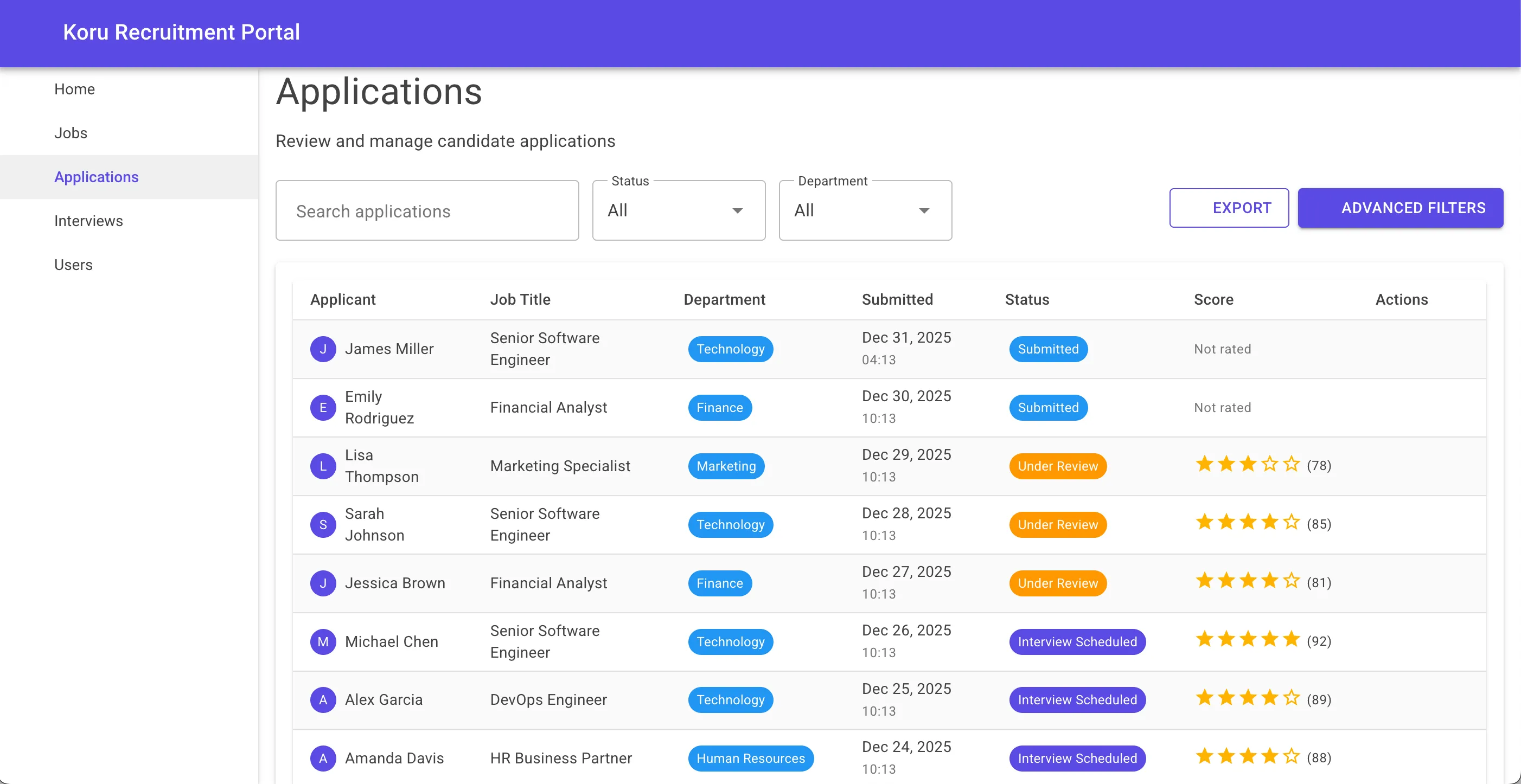 Complete application lifecycle with scoring, status updates, and advanced filtering
Interview scheduling
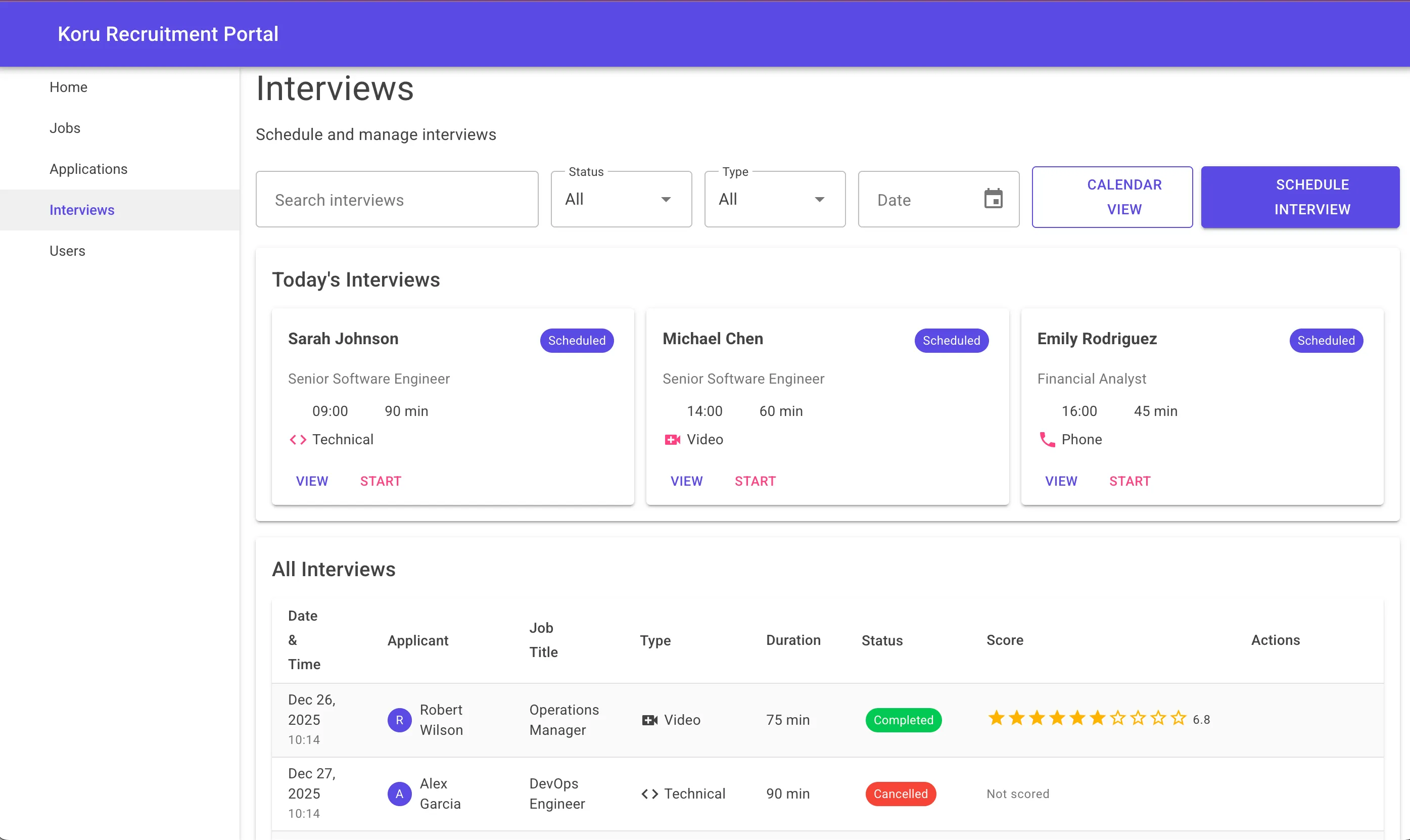 Today’s interviews at a glance, with support for video, phone, and in-person formats
I used the same briefs and component patterns across these pages. That gave the generated code a consistent starting point, although I still checked each page rather than assuming the pattern had been followed correctly.
Renaming the project
The name changed several times during development before I settled on “Koru”. Moving the solution from the earlier naming convention to the final Koru.Recruitment namespace meant:
- Rename projects
- Update namespaces
- Fix all references
- Update configuration files
- Modify pipelines
It was a multi-hour change. I used a coding assistant to identify affected files and draft migration scripts. It was useful for finding the mechanical changes, but the result still needed a repository-wide search and a build to catch stale references.
Running cost
Running in production:
| Component | Monthly Cost |
|---|---|
| Azure Static Web Apps | Free |
| Azure Functions (Consumption) | ~$5 |
| Azure SQL (Basic) | ~$5 |
| Azure Blob Storage | ~$1 |
| Azure Key Vault | ~$1 |
| Total | ~$12/month |
That put the initial deployment at about $12 a month, below the $50 limit. The estimate depends on the expected early usage and would need revisiting as traffic, storage and database demand increase.
The pipeline in practice
The Azure DevOps deployment has six stages:
 Validate → Infrastructure → Database → Applications → Post-Deployment → Notifications
The run shown completed in under 20 minutes. That included the Terraform infrastructure, database schema and application deployment to Azure Static Web Apps.
What is left
The platform is deployed and ready for production use. The possible next additions are:
- Video interviewing integration
- Advanced analytics dashboard
- Mobile application
- Multi-language support