How We Cut AWS Hosting Costs from $12,000 to $40 a Month
How we moved a healthcare ordering system from EC2 to AWS Lambda and S3, reducing monthly hosting costs from $12,000 to $40

We had an AWS hosting bill of $12,000 per month for a healthcare ordering platform. After moving it from EC2 to Lambda and S3, the bill came down to about $40 per month. The system still processes more than 30,000 orders a month across three regions.
I will call the platform Meridian. Some names have been changed.
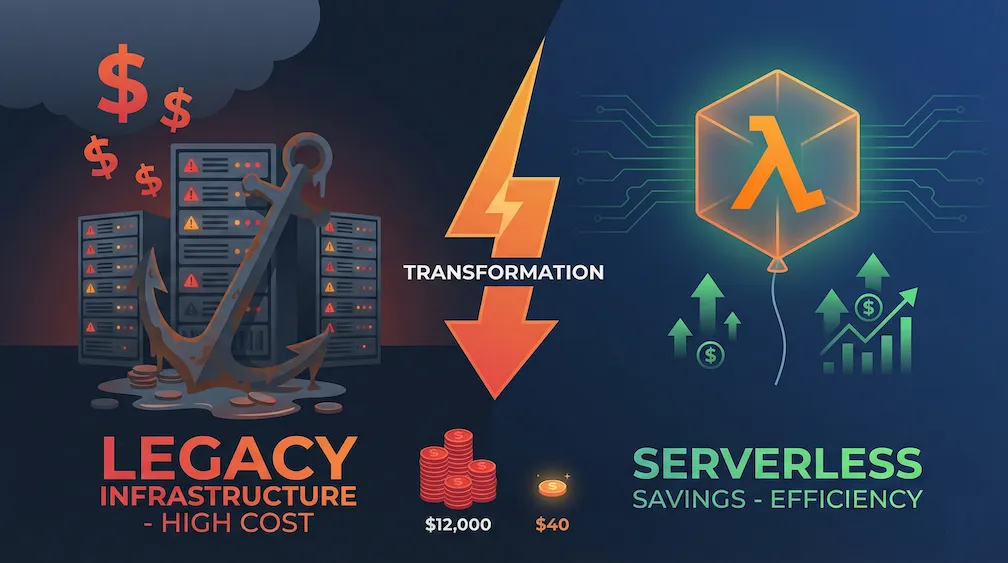
How We Got to $12,000 a Month
The first move was a familiar one: take the existing virtual machines and run them as EC2 instances. Lift and shift gets an application out of the data centre quickly, but it does not change how the application consumes infrastructure. You still pay for machines whether they are busy or not.
Meridian started as an on-premises .NET application. Moving it to EC2 was the shortest route to AWS, and the application carried on working as before.
Then the invoice arrived.
The $12,000 Monthly Bill
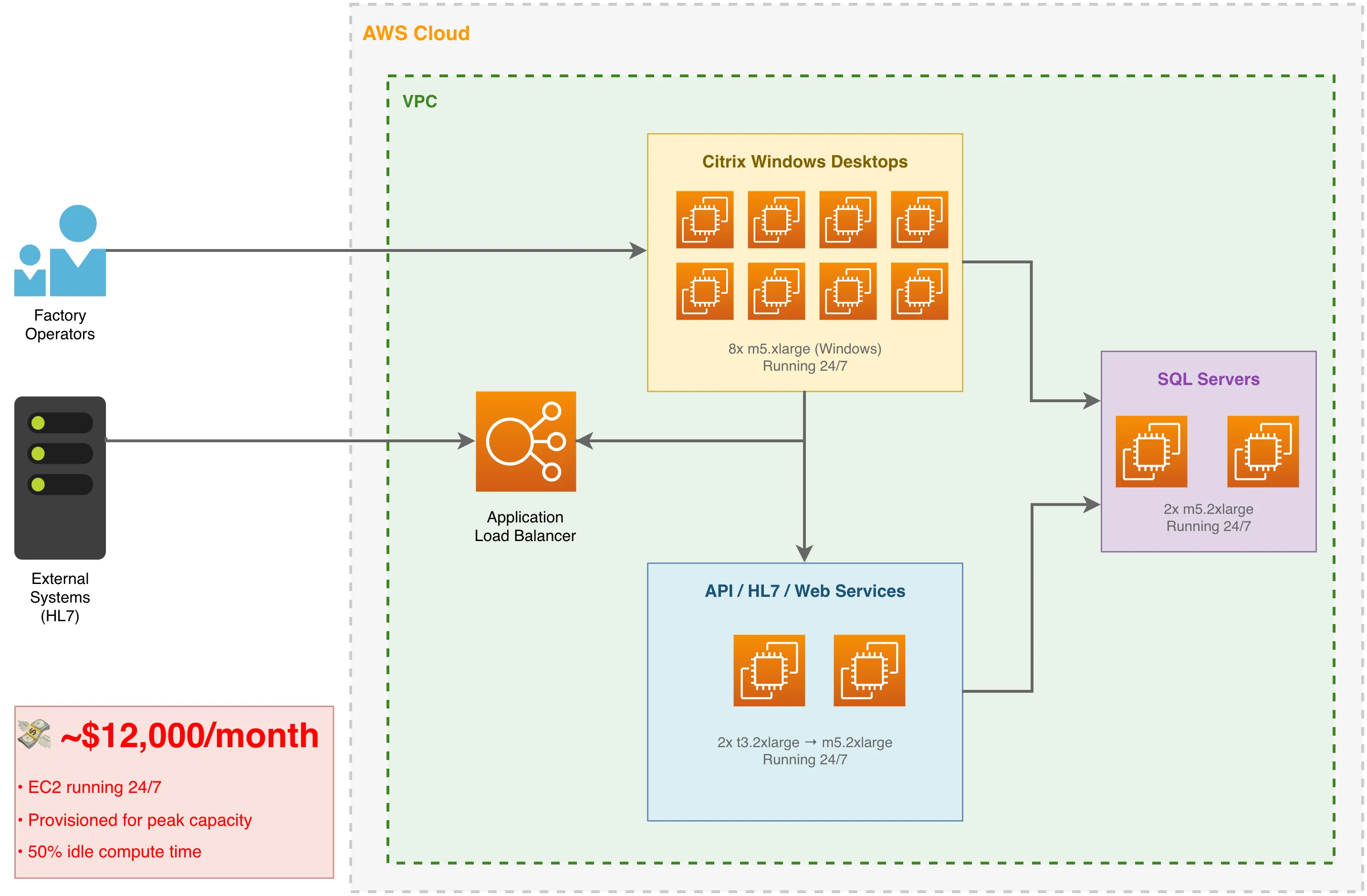
Here’s what was running in each primary region:
| Component | Instance Type | Hourly Rate | Monthly Cost |
|---|---|---|---|
| HL7 Processor / API / Web Service (2x) | t3.2xlarge → m5.2xlarge | $0.33 → $0.38 | ~$560 |
| Administrative Frontend with Citrix (8x) | m5.xlarge (Windows) | $0.376 | ~$2,200 |
| Application Load Balancers (2x) | ALB | - | ~$600 |
| EBS Storage, snapshots, data transfer | Various | - | ~$1,380 |
| Reserved capacity overhead | RI premiums | - | ~$800 |
| CloudWatch, WAF, secrets, misc | Various | - | ~$460 |
| Total (per primary region) | ~$6,000 |
These figures exclude the database, whose cost stayed the same after the migration. There were also 2 service EC2 instances and 2 Citrix servers in a third, smaller region.
Across all three regions combined, the total landed at ~$12,000/month.
In the primary regions, factory floor operators used the Citrix-based Windows servers to reach the administrative application. Those machines had to cope with peak shift changes, but that peak load only occurred about 40% of the time. For the remaining 60%, we were paying for mostly idle compute.
What We Replaced It With
The workload varied through the day, so Lambda was a better fit. Instead of keeping servers running around the clock, we could pay when the code actually ran.
The New Architecture
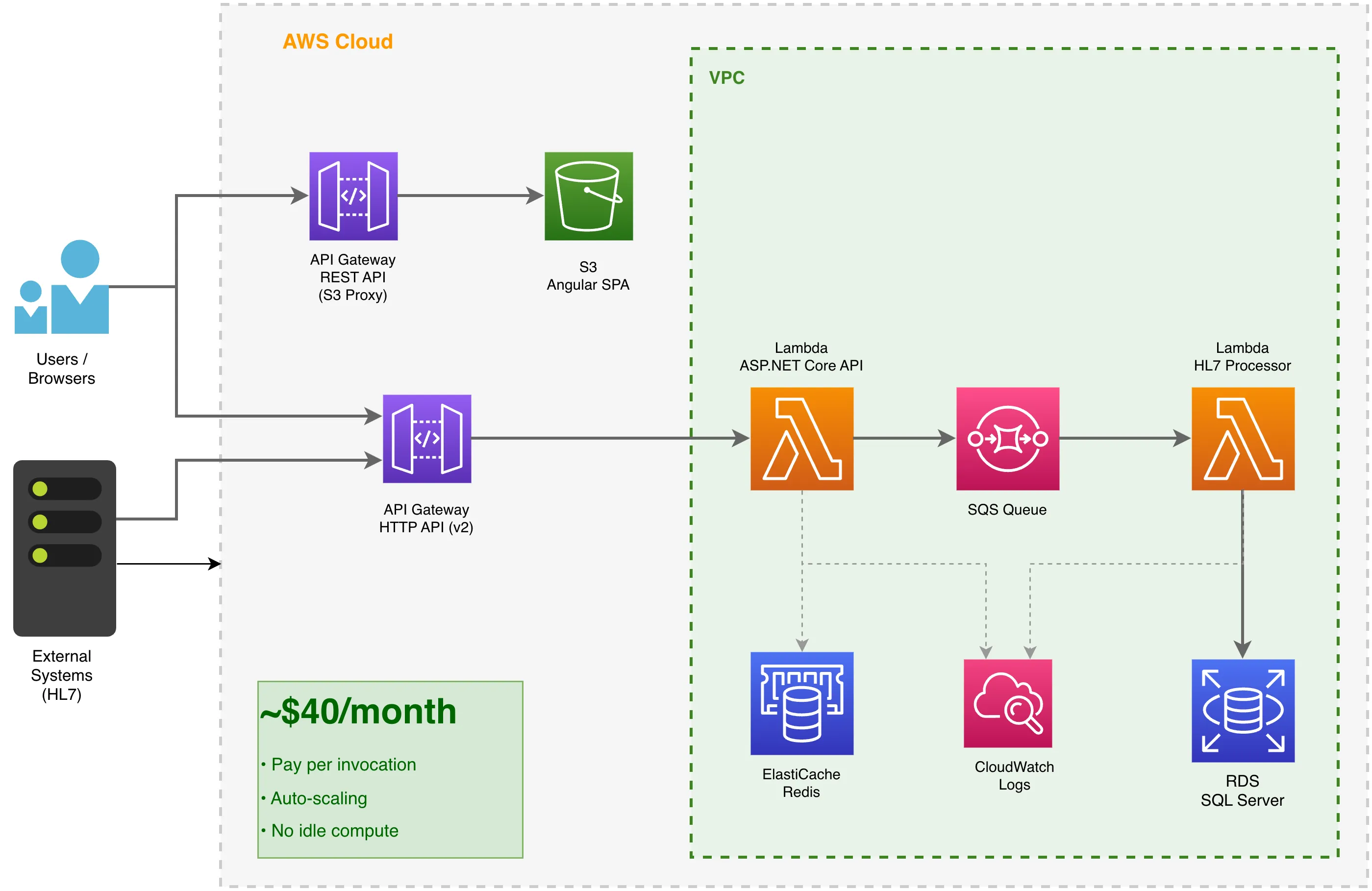
The new architecture used:
- AWS Lambda (API) - Hosts the ASP.NET Core API using Amazon.Lambda.AspNetCoreServer
- AWS Lambda (HL7 Processor) - Processes healthcare messages from SQS
- API Gateway HTTP API (v2) - Routes API requests to the ASP.NET Lambda
- API Gateway REST API - Acts as a proxy for the S3-hosted frontend
- S3 - Hosts the Angular SPA (static files)
- SQS - Queues HL7 messages for async processing (critical for staying within Lambda timeout)
- ElastiCache - Redis for distributed caching
The SQS Pattern for HL7 Processing
HL7 processing time can be unpredictable. Lambda has a 15-minute timeout, and leaving an API request open while the work completes is asking for trouble. We enqueue the message and return immediately:
- API Lambda receives the HL7 message
- Validates the payload and enqueues to SQS immediately
- Returns HTTP 202 Accepted - total time: milliseconds
- HL7 Processor Lambda picks up the message from SQS
- Processes the order in under 15 seconds
This keeps the API responsive and moves the longer work out of the request. SQS also provides the retry and dead-letter queue handling when processing fails.
API Gateway REST API as S3 Proxy
Rather than exposing the S3 bucket directly and dealing with the resulting CORS configuration, we put an API Gateway REST API in front of the Angular SPA. That gives us:
- Custom domain support - The frontend is served from
app.example.com, notbucket.s3.amazonaws.com - TLS termination - API Gateway handles certificates
- No CORS complexity - API and frontend share the same origin
- Path-based routing -
/static/*and/assets/*map to S3 paths
The Terraform looks like this:
resource "aws_api_gateway_rest_api" "proxy_api" {
  name               = var.api_name
  binary_media_types = ["*/*"]
  endpoint_configuration {
    types = ["REGIONAL"]
  }
}

resource "aws_api_gateway_integration" "root_get_integration" {
  rest_api_id             = aws_api_gateway_rest_api.proxy_api.id
  resource_id             = aws_api_gateway_rest_api.proxy_api.root_resource_id
  http_method             = aws_api_gateway_method.root_get_method.http_method
  type                    = "AWS"
  integration_http_method = "GET"
  uri                     = "arn:aws:apigateway:${data.aws_region.current.region}:s3:path/${var.site_bucket_name}/index.html"
  credentials             = var.s3_role
}
The {proxy+} catch-all route returns index.html for any unmatched path, enabling client-side routing in the Angular SPA.
Running ASP.NET Core in Lambda
Lambda is not limited to a collection of tiny functions. We run the entire ASP.NET Core application in it. This is the entry point:
public class LambdaEntryPoint : Amazon.Lambda.AspNetCoreServer.APIGatewayHttpApiV2ProxyFunction
{
    protected override void Init(IHostBuilder builder)
    {
        Log.Logger = new LoggerConfiguration()
            .Enrich.FromLogContext()
            .WriteTo.Console()
            .CreateLogger();

        builder
            .UseSerilog((ctx, config) =>
            {
                config.ReadFrom.Configuration(ctx.Configuration);
            })
            .ConfigureWebHostDefaults(webBuilder =>
            {
                webBuilder
                    .UseStartup<Startup>()
                    .UseLambdaServer();
            });
    }
}
Startup.cs stays almost identical to the version used for traditional ASP.NET Core hosting. Controllers, dependency injection and middleware continue to work.
Provisioning It with Terraform
This Terraform provisions the Lambda function:
resource "aws_lambda_function" "lambda" {
  function_name    = local.function_name
  description      = local.function_description
  filename         = local.function_package_path
  source_code_hash = filebase64sha256(local.function_package_path)
  role             = data.aws_iam_role.lambda.arn
  handler          = local.function_handler
  runtime          = "dotnet8"
  memory_size      = 1024
  timeout          = 30

  logging_config {
    application_log_level = "INFO"
    log_format            = "JSON"
    log_group             = aws_cloudwatch_log_group.lambda.name
    system_log_level      = "INFO"
  }

  vpc_config {
    security_group_ids = [data.aws_security_group.lambda.id]
    subnet_ids         = local.subnet_ids
  }

  environment {
    variables = var.function_environment_variables
  }
}
The API Gateway routes traffic to it:
resource "aws_apigatewayv2_api" "api_lambda" {
  name          = local.api_name
  protocol_type = "HTTP"

  tags = merge(var.tags, { "Name" = local.api_name })
}

resource "aws_lambda_permission" "lambda" {
  statement_id  = "AllowExecutionFromAPIGateway"
  action        = "lambda:InvokeFunction"
  function_name = aws_lambda_function.lambda.function_name
  principal     = "apigateway.amazonaws.com"
  source_arn    = "${aws_apigatewayv2_api.api_lambda.execution_arn}/*/*"
}
For the static Angular frontend, we use S3 behind a classic API Gateway REST API proxy:
resource "aws_s3_bucket" "site_bucket" {
  bucket = var.site_bucket_name

  tags = merge(var.tags, {
    Name = var.site_bucket_name
  })
}

resource "aws_s3_bucket_website_configuration" "website" {
  bucket = aws_s3_bucket.site_bucket.id

  index_document {
    suffix = "index.html"
  }

  error_document {
    key = "error.html"
  }
}

resource "aws_api_gateway_rest_api" "proxy_api" {
  name               = var.api_name
  description        = "Client proxy"
  binary_media_types = ["*/*"]
  endpoint_configuration {
    types = ["REGIONAL"]
  }
}

# Root route -> S3 index.html (SPA entry point)
resource "aws_api_gateway_integration" "root_get_integration" {
  rest_api_id             = aws_api_gateway_rest_api.proxy_api.id
  resource_id             = aws_api_gateway_rest_api.proxy_api.root_resource_id
  http_method             = aws_api_gateway_method.root_get_method.http_method
  type                    = "AWS"
  integration_http_method = "GET"
  uri                     = "arn:aws:apigateway:${data.aws_region.current.region}:s3:path/${var.site_bucket_name}/index.html"
  credentials             = var.s3_role
}
The $40 Monthly Bill
After migration, the new cost structure across all regions combined:
| Component | Pricing Model | Monthly Cost |
|---|---|---|
| Lambda (API) | Pay per invocation | ~$12 |
| Lambda (HL7 Processor) | Pay per invocation | ~$8 |
| API Gateway HTTP API (v2) | Per request | ~$5 |
| API Gateway REST API (S3 proxy) | Per request | ~$3 |
| S3 (static hosting) | Storage + requests | ~$2 |
| CloudWatch Logs | Ingestion + storage | ~$10 |
| Total (all regions) | ~$40 |
That is $40 instead of $12,000 per month across all regions, a 99.7% reduction.
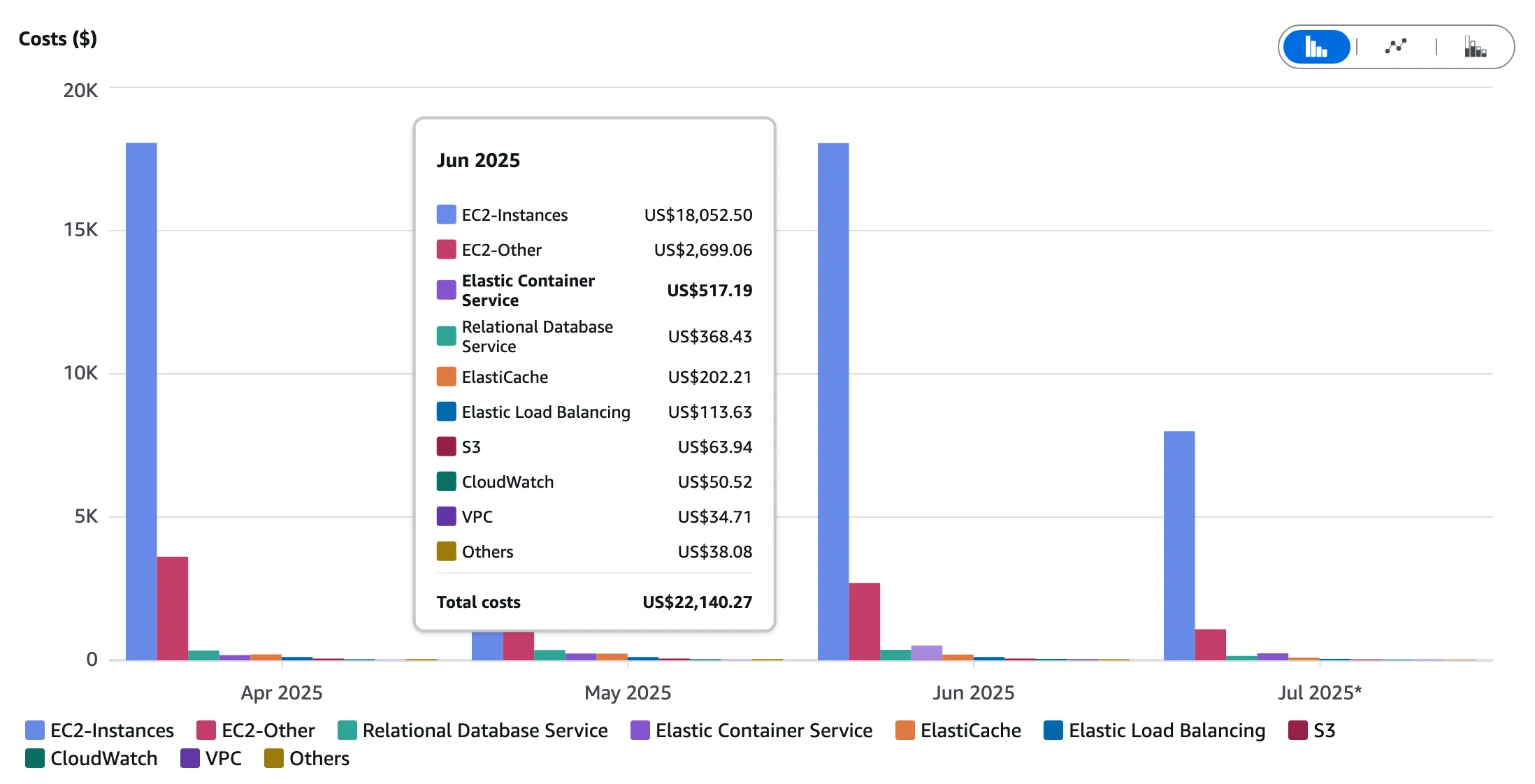 The Lambda and S3 costs are small enough to appear as “Others” on the chart.
1. We Stopped Paying for Idle Compute
EC2 instances run 24/7. Lambda runs when invoked. For an application used mainly during working hours, that can mean paying for roughly 50 hours of actual compute rather than 720 hours of server uptime.
2. Capacity Follows Demand
With EC2, we provisioned for peak load. Lambda scales automatically, so we no longer keep that peak capacity running when it is not needed.
3. There Are No Servers for Us to Maintain
There is no operating system for us to patch or update, and no server capacity to plan. AWS manages that infrastructure.
4. SQS Replaced the Always-On Workers
Background processing moved from dedicated EC2 workers to Lambda functions triggered by SQS. When the queue is empty, no compute runs.
Trade-offs and Considerations
This was not a free lunch. We had to account for:
- Cold starts - First request after idle period is slower (~1-3 seconds for .NET). Use Provisioned Concurrency if this is critical.
- Execution limits - Lambda has a 15-minute timeout. Long-running processes need SQS queuing (as we did for HL7 processing).
- VPC considerations - Lambda in VPC adds latency. Plan your network architecture carefully.
- Observability - Structured logging is essential. We use Serilog with CloudWatch Logs and output JSON so that we can query it properly.
The Migration Path
We did not rewrite everything in one go. The migration was gradual:
- Platform-agnostic rewrite - Migrated from .NET Framework to .NET Core for cross-platform compatibility
- Lambda-ify the API - Added Lambda entry point alongside traditional hosting (same codebase runs both ways)
- Deploy in parallel - Ran both EC2 and Lambda, routing traffic gradually via weighted DNS
- Migrate static assets - Moved Angular app to S3 behind API Gateway REST API proxy
- Decommission EC2 - Once stable, terminated the instances
We completed the migration without customer-facing downtime.
The result
Lift and shift did its job: it got the application into AWS quickly. It was not a sensible place to leave this particular workload. Reworking the hosting around Lambda, SQS and S3 removed most of the idle infrastructure cost.
For Meridian across three regions:
- Before: ~$12,000/month (EC2 lift and shift)
- After: ~$40/month (Lambda + S3)
- Annual savings: ~$143,500
The saving is roughly $144,000 per year for an application processing more than 30,000 healthcare orders each month.
I would not claim that every EC2 workload belongs in Lambda. Persistent connections, long-running work and predictable high utilisation can point elsewhere. For variable workloads like this one, though, the original EC2 estate was an expensive way to spend much of the day doing very little.